
Theft Catcher: Protect Your Phone from Thieves Easily
Theft Catcher protects your phone from thieves by capturing intruders’ photos, tracking their location, and alerting you instantly to secure your device.
Have you ever feared that you lost your phone or somebody hacked into your personal information? Think of how a person could attempt to open your phone unlawfully, this may be very frustrating and dangerous. Theft Catcher manages to address this issue by covertly taking a photo of the intruder and monitoring the location of your device and sending notifications instantly, hence you can protect your phone and personal information without much effort.
What is Theft Catcher?
Theft Catcher is an intelligent application on Android platform that guards against theft of your phone. It silently operates in the background and it becomes activated when one attempts to unlock their phone with a different password or pattern.
The application is able to capture a photo of the intruder, monitor the location of your phone and forward email notifications. This will assist you to know who has tried to get into your device and secure your personal information.
How to Install and Set Up Theft Catcher
Step 1: Download the App
On your Android-based phone, visit Google Play Store and search Theft Catcher. Install to install the app.
Step 2: Open the App
Once installed, open the app. To make the app work, you might be required to give the application permissions like the camera, location, and storage.
Step 3: Select a Password or Pattern
You should come up with a secure password or pattern that will unlock your phone. This makes the app be able to identify unauthorized access.
Step 4: Toggle-On Theft Catcher Features
Turn on features like:
Intruder selfie– takes a picture when a person uses the wrong password.
Email alerts- shares intruder photo and site with email.
Location tracking – allows tracking your phone in case of theft.
Step 5: Test the App
Attempt to input an incorrect password to ensure that the app captures a photo and provides a notification. This makes certain that everything is going right.
Step 6: Keep the App Running in Background
The app can be used most effectively when it is used in the background, thus it is not necessary to close it fully. This ensures that your phone is always secure.
Also Read:Gesture Lock Screen APK – Smart Security for Android
Key Features of Theft Catcher App
Intruder Selfie
The application captures an image of whoever uses the incorrect password or pattern to unlock your phone. This will allow you to know the individual who is attempting to use your device without your consent. You can still find a clear photo of the thief even he or she covers his face just to make it easier to track them out later.
Email Alerts
Every time a person types in an incorrect password, the application sends the photo of the intruder and your location with your phone sent straight to your email. This will mean that you will receive instant updates wherever you are. You do not need to check your phone every time to be aware of whether somebody is attempting to unlock the phone.
GPS Location Tracking
The application is used to track the whereabouts of your phone as it happens, this way, you can locate your phone in case it is lost or stolen. You are able to find out the position of your phone on a map and make instant actions. This is a good feature when your phone is transferred between places.
Stealth Mode
The theft Catcher operates silently on the background and therefore the intruders are not aware of the presence of the app. It is not displayed with any notifications and icons, so it is not visible at all. This will make sure that the individual who attempts to unlock your phone will not be able to turn off the application.
Easy Setup and Use
The app is easy to use and install and any person can ensure that his/her phone is protected. It can be installed by following on-screen instructions within a few minutes even by novices. You do not require technical expertise in order to ensure that your phone is safe.
Security against Unauthorized Access
The application notifies you every time anyone attempts to unlock your phone. It assists in protecting your personal details, photographs, text messages, and all kinds of other personal information. It is always easy to tell when a person is attempting to interfere with your gadget.
Free to Use
Theft Catcher has most of its core functions that are free. There is no need to spend money to secure your phone on the basic level. This renders it an affordable measure to all people who are willing to ensure that their devices are safeguarded.
Also Explore:Lion APK
Theft Catcher and How It Can Help in securing your Smartphone
The theft Catcher assists in securing your smart phone by keeping track of illegitimate access attempts. The app also takes a snap of the intruder with her or his front camera when one attempts to unlock his or her phone with an incorrect password or pattern. This will enable you to know who made an attempt to access your device without authorization.
The other method of keeping your phone safe by Theft Catcher is by sending you email notifications and whereabouts. In case you lose or get stolen your phone, it will be capable of tracking its position using GPS and take some action. These options will ensure that your personal information, photos, and other valuable information is not shared with thieves or other unidentified users.
Common Problems Users Face with Theft Catcher
1- App Not Working in Background
Sometimes the app stops working in the background due to battery optimization settings on the phone. When this happens, the app may not capture intruder photos or send alerts properly.
2- Camera Permission has not been enabled
In case the camera permission is not granted, the intruder cannot be photographed by the app. This permission is often not activated by many users during the setup.
3- Email Alerts Not Received
The intruder photos or location alerts are not sent in the email of some users. This will normally occur when the email is not properly set up or when internet connectivity is poor.
4- GPS Location Not Accurate
The geo location service might fail to indicate the correct location in the event the GPS on the phone is off. Location accuracy can also be affected in a few instances by poor network signals.
5- App Crashing or Freezing
The app can be crashing or freezing on the devices because of compatibility problems or old software. This issue can be fixed by updating the app or system of the phone.
Best Alternatives to Theft Catcher Apps
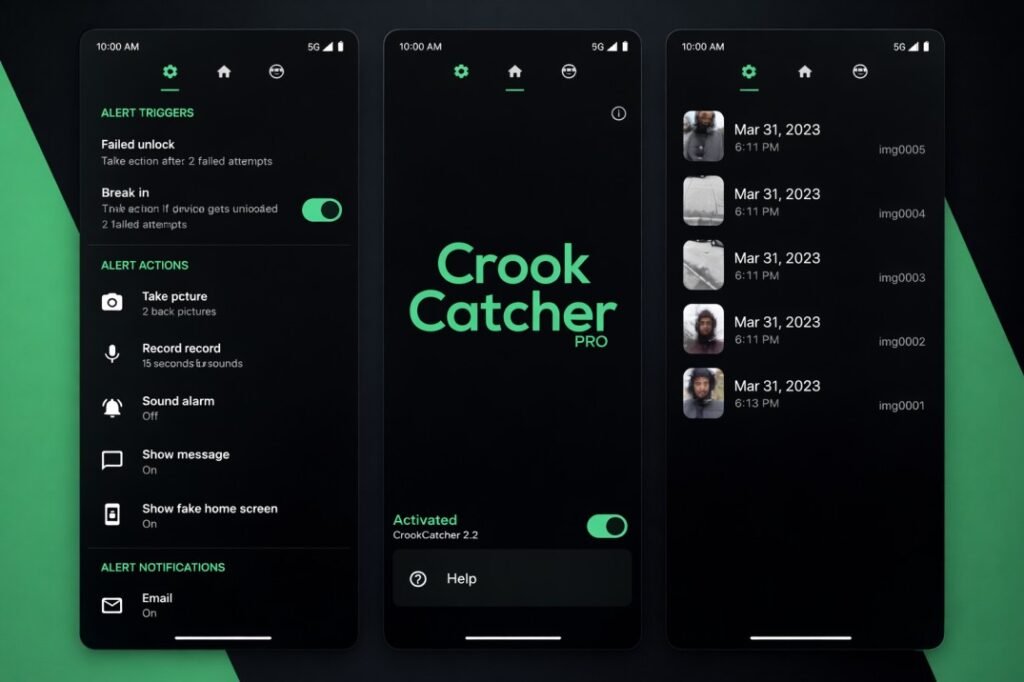
CrookCatcher:
CrookCatcher is a popular security app that takes a selfie of anyone who tries to unlock your phone with the wrong password. The photo is saved inside the app and helps you identify who attempted to access your device. It also allows you to set the number of failed unlock attempts before the camera captures the image.
Hidden Eye – Intruder Selfie
Hidden Eye is another useful alternative that captures photos when someone enters the wrong PIN, pattern, or password. The pictures are saved in the gallery so users can easily see who tried to unlock their phone. This app works silently and helps protect your phone from unauthorized access.
Conclusion
Theft Catcher is a useful tool for improving smartphone security and protecting personal data from unauthorized access. With features like intruder selfies, email alerts, and location tracking, it helps users quickly identify suspicious activity and keep their devices safe. By understanding how the app works, its features, common issues, and possible alternatives, users can choose the best method to secure their smartphones and reduce the risk of theft.
.